Real-Time Downtime Logging: Now Available on Mobile
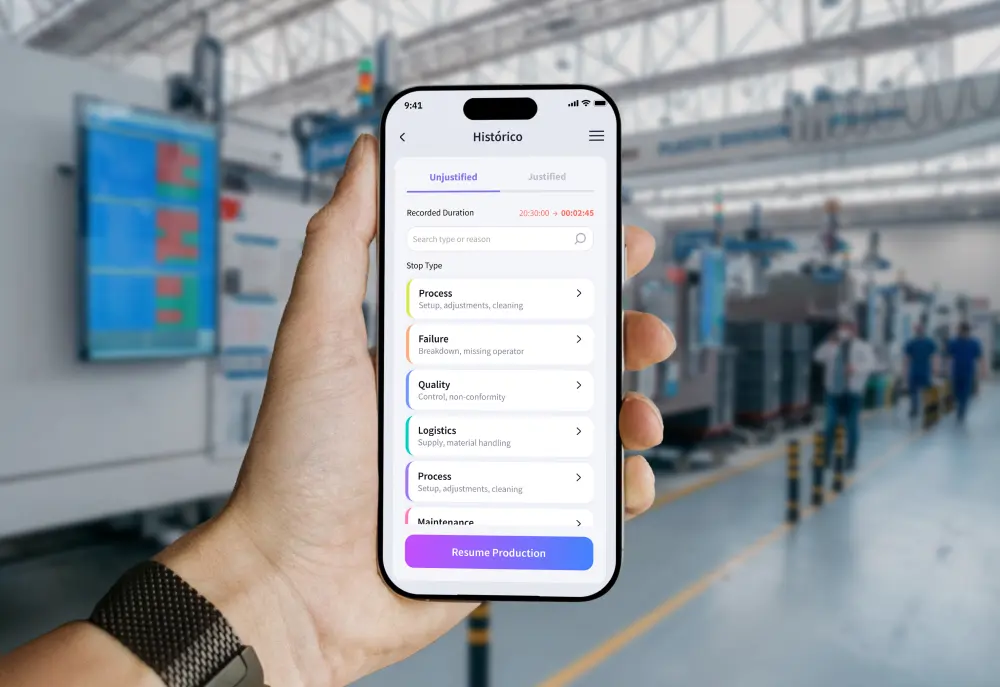
When a machine stops, every second of delay directly cuts production and raises costs. Traditional downtime tracking relies on operators walking across the factory floor to fixed computers or filling out paper sheets at the end of the shift. Mobile downtime logging solves this problem: it lets operators and managers record stop reasons, track active downtime live, and restart production in seconds, right from a smartphone.
Connecting Operators for Faster, Seamless Shopfloor Operations
In modern manufacturing, connecting human action to machine events is essential to run operations smoothly. While proGrow has long offered robust downtime justifications right at the machine via shopfloor tablets, the addition of the mobile app provides extra flexibility for teams on the move. Recording downtime immediately, whether on a fixed tablet or on a mobile phone, eliminates reporting delays, catches hidden micro-stoppages, and delivers clean OEE data directly to decision-makers.
.webp)
Why is Downtime Justification so important? (And the hidden costs of ignoring it)
On the factory floor, fast response time is critical to keep Overall Equipment Effectiveness (OEE) high. However, traditional logging methods rely on central fixed computers or manual paper forms filled out hours after an event happens.
This friction creates three major blind spots on the shopfloor:
- Reporting Delays: Hours often pass before supervisors know why a machine stopped. This delays maintenance help, extends repair times, and prolongs avoidable downtime.
- Inaccurate OEE Data: End-of-shift logging relies heavily on memory. When forced to recall events hours later, operators routinely pick generic stop reasons, which skews availability numbers and hides real issues.
- Missed Micro-Stoppages: Minor stops lasting under two minutes are rarely logged on distant computers because the effort to walk over isn't worth it. Over time, these unrecorded micro-stoppages quietly drain overall plant capacity.
Traditional Logging vs. Downtime Justification on proGrow
%20(1).webp)
How Does Mobile Tracking Provide Real-Time Clarity?
Building on the proven success of proGrow’s shopfloor tablets, the new mobile capability extends these capabilities directly to workers on the move. By combining dedicated station tablets with a flexible mobile interface, fully customizable to fit the specific stop codes, processes, and nuances of your industry, plant operations close the gap between machine alerts and fast corrective action
Tap Stoppage Logging
Operators select pre-set reasons (Process, Breakdown, Quality, Logistics, etc.) and resume tracking with a single tap on a tablet or mobile screen.
Real-Time Alerts
Get instant mobile alerts for unjustified stoppages to keep the shopfloor moving.
.webp)
Live Stoppage Tracking
Teams monitor active downtime on their smartphones as it happens, getting instant visibility into the impact of the stop even when away from their primary station.
Shift Progress & Status
Track real-time machine availability, downtime counters, and production targets at a glance directly from the main status dashboard.
.webp)
How Mobile Tracking Supports Lean and ISA-95 Standards
According to Lean Manufacturing principles, eliminating unnecessary movement and providing flexible tools are fundamental to continuous improvement. Pairing dedicated machine tablets with mobile logging gives operators the best tool for every scenario, eliminating wasted effort during repair events.
Industry research shows that digitizing frontline work speeds up root-cause resolution and meets ISA-95 standards by linking machine alerts (Level 2) directly to human input (Level 3). Capturing precise operator context in real time removes confusion across the entire company.
Empowering Frontline Manufacturing Teams
Downtime logging on proGrow goes beyond basic tracking—it changes shopfloor culture. Combining trusted station tablets with new mobile flexibility gives frontline workers convenient, powerful tools that build accountability, remove administrative paperwork, and keep teams focused on what matters most: keeping production lines moving.
Upgrade Your Shopfloor Tracking Today
Don't have proGrow yet? Schedule a personalized demo with our team to see our shopfloor tablets and mobile tracking live in action.

More articles
.webp)
Webinar: Customer Voice in 5.0 Industry with Luís Alves
Luís Alves shares how Formaplás transformed its shop floor using proGrow's real-time connectivity, AI analytics, and digital monitoring.
.webp)
How to Use the Supervisor View in the proGrow One App
Master your shopfloor with proGrow One App’s Supervisor View. Monitor real-time OEE, track machine downtime, and boost factory efficiency.

OEE & TEEP Calculation: How Context Fixes Faulty Shopfloor Metrics
Stop penalizing your shopfloor with a broken OEE calculation. Learn how to map planned vs unplanned downtime accurately using smart software.